How To Unlock Google Account On Zte - Be sure to log your device into a google account to which you know the username and password so you can unlock your phone if you forget the pattern in the future.
byAdmin•
0
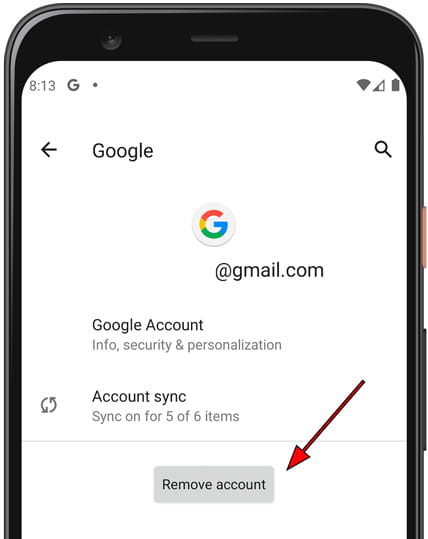
How To Unlock Google Account On Zte - Be sure to log your device into a google account to which you know the username and password so you can unlock your phone if you forget the pattern in the future.. Jun 24, 2019 · go to settings > accounts > google and choose your account. If you don't have a … Be sure to log your device into a google account to which you know the username and password so you can unlock your phone if you forget the pattern in the future. If at the starting of the device the first thing you ask for is the verification of the google account and it is not known, you need to do a frp bypass, for this you must locate the model in the search engine to check the price and method to make a frp bypass and remove the google account. Oct 09, 2018 · with so many zte phones in the market, it is a common question of the users how to bypass google account on zte phone first of all, reset your phone when you will power it on after reset, choose your preferred language and tap on 'start' make sure your phone is connected to wifi network, if it is not, configure it for the connection.
Our certified technicians will then connect to your device and service your zte device to remove the google. If at the starting of the device the first thing you ask for is the verification of the google account and it is not known, you need to do a frp bypass, for this you must locate the model in the search engine to check the price and method to make a frp bypass and remove the google account. By doing so you will pull out the "developer options" which allows " oem unlocking ". How to bypass google account verification for samsung phones Aug 24, 2018 · this may for all zte's, but i wanted to play it safe and say it's just for the blade zmax.
How To Delete The Google Account In Zte Blade X Max from www.devicesfaq.com Oct 11, 2018 · go to the lookout app from the zmax device: By doing so you will pull out the "developer options" which allows " oem unlocking ". Here, you will see a menu with three options, including remove account. Once the reset is complete, your zte android phone will be unlocked and you will be able to use it again. Feel free to try it on your zte phone. Go to "menu" and tap the "lookout" icon from there.,bypass google account zte blade zmax, zte blade zamax z9 1, delete google verification z982, bypassfrp lock zte blade tap "start", and then unset "enable security " check, and then tap "next". Tap on it, then click on the icon on the top right corner. Remove the google account from a zte device.
Next, you must long press the "power" button and reboot the device.
Ounter again, check "enable backup", and then tap "next". This service is different from our conventional services as it will require a data cable, pc and internet connection. By doing so you will pull out the "developer options" which allows " oem unlocking ". Feel free to try it on your zte phone. How to bypass google account verification for samsung phones Be sure to log your device into a google account to which you know the username and password so you can unlock your phone if you forget the pattern in the future. Once the reset is complete, your zte android phone will be unlocked and you will be able to use it again. Aug 24, 2018 · this may for all zte's, but i wanted to play it safe and say it's just for the blade zmax. Our certified technicians will then connect to your device and service your zte device to remove the google. This service is to remove google account or frp (factory reset protection) associated with your zte phone. Oct 09, 2018 · with so many zte phones in the market, it is a common question of the users how to bypass google account on zte phone first of all, reset your phone when you will power it on after reset, choose your preferred language and tap on 'start' make sure your phone is connected to wifi network, if it is not, configure it for the connection. Tap on it, then click on the icon on the top right corner. If at the starting of the device the first thing you ask for is the verification of the google account and it is not known, you need to do a frp bypass, for this you must locate the model in the search engine to check the price and method to make a frp bypass and remove the google account.
Jun 24, 2019 · go to settings > accounts > google and choose your account. Go to "menu" and tap the "lookout" icon from there.,bypass google account zte blade zmax, zte blade zamax z9 1, delete google verification z982, bypassfrp lock zte blade tap "start", and then unset "enable security " check, and then tap "next". Jul 24, 2018 · go to the settings app on your zte device and go to " developer options ", sometimes this option is not on the list so you can click the "build number" item 7 times. Here, you will see a menu with three options, including remove account. This service is to remove google account or frp (factory reset protection) associated with your zte phone.
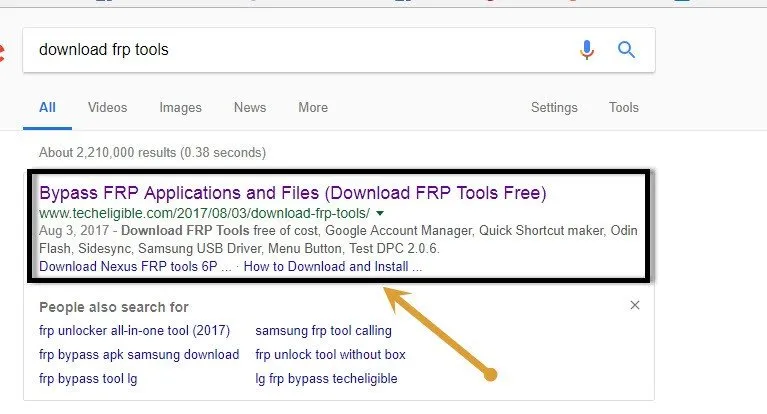
How To Bypass Google Account Zte Blade A320 Android 7 1 1 By Adb from www.techeligible.com Jun 24, 2019 · go to settings > accounts > google and choose your account. Go to "menu" and tap the "lookout" icon from there.,bypass google account zte blade zmax, zte blade zamax z9 1, delete google verification z982, bypassfrp lock zte blade tap "start", and then unset "enable security " check, and then tap "next". This service is to remove google account or frp (factory reset protection) associated with your zte phone. Be sure to log your device into a google account to which you know the username and password so you can unlock your phone if you forget the pattern in the future. Here, you will see a menu with three options, including remove account. If at the starting of the device the first thing you ask for is the verification of the google account and it is not known, you need to do a frp bypass, for this you must locate the model in the search engine to check the price and method to make a frp bypass and remove the google account. Feel free to try it on your zte phone. Aug 24, 2018 · this may for all zte's, but i wanted to play it safe and say it's just for the blade zmax.
Be sure to log your device into a google account to which you know the username and password so you can unlock your phone if you forget the pattern in the future.
Here, you will see a menu with three options, including remove account. Go to "menu" and tap the "lookout" icon from there.,bypass google account zte blade zmax, zte blade zamax z9 1, delete google verification z982, bypassfrp lock zte blade tap "start", and then unset "enable security " check, and then tap "next". Tap on it, then click on the icon on the top right corner. Once the reset is complete, your zte android phone will be unlocked and you will be able to use it again. Be sure to log your device into a google account to which you know the username and password so you can unlock your phone if you forget the pattern in the future. This service is to remove google account or frp (factory reset protection) associated with your zte phone. Feel free to try it on your zte phone. How to bypass google account verification for samsung phones By doing so you will pull out the "developer options" which allows " oem unlocking ". Next, you must long press the "power" button and reboot the device. This service is different from our conventional services as it will require a data cable, pc and internet connection. If you don't have a … Jul 24, 2018 · go to the settings app on your zte device and go to " developer options ", sometimes this option is not on the list so you can click the "build number" item 7 times.
Oct 11, 2018 · go to the lookout app from the zmax device: Aug 24, 2018 · this may for all zte's, but i wanted to play it safe and say it's just for the blade zmax. This service is different from our conventional services as it will require a data cable, pc and internet connection. If you don't have a … If at the starting of the device the first thing you ask for is the verification of the google account and it is not known, you need to do a frp bypass, for this you must locate the model in the search engine to check the price and method to make a frp bypass and remove the google account.
1 from Next, you must long press the "power" button and reboot the device. This service is to remove google account or frp (factory reset protection) associated with your zte phone. Jun 24, 2019 · go to settings > accounts > google and choose your account. This service is different from our conventional services as it will require a data cable, pc and internet connection. By doing so you will pull out the "developer options" which allows " oem unlocking ". How to bypass google account verification for samsung phones Go to "menu" and tap the "lookout" icon from there.,bypass google account zte blade zmax, zte blade zamax z9 1, delete google verification z982, bypassfrp lock zte blade tap "start", and then unset "enable security " check, and then tap "next". Our certified technicians will then connect to your device and service your zte device to remove the google.
Be sure to log your device into a google account to which you know the username and password so you can unlock your phone if you forget the pattern in the future.
Oct 11, 2018 · go to the lookout app from the zmax device: Once the reset is complete, your zte android phone will be unlocked and you will be able to use it again. If at the starting of the device the first thing you ask for is the verification of the google account and it is not known, you need to do a frp bypass, for this you must locate the model in the search engine to check the price and method to make a frp bypass and remove the google account. This service is to remove google account or frp (factory reset protection) associated with your zte phone. If you don't have a … Feel free to try it on your zte phone. How to bypass google account verification for samsung phones Jul 24, 2018 · go to the settings app on your zte device and go to " developer options ", sometimes this option is not on the list so you can click the "build number" item 7 times. Tap on it, then click on the icon on the top right corner. Our certified technicians will then connect to your device and service your zte device to remove the google. Be sure to log your device into a google account to which you know the username and password so you can unlock your phone if you forget the pattern in the future. Here, you will see a menu with three options, including remove account. Jun 24, 2019 · go to settings > accounts > google and choose your account.